 Enhanced IO - Configuration
The Enhanced IO interface has 4 programmable inputs and 2
programmable outputs.
Note: The EIO Input feature is not available for our standard
interface units, ONLY for those who have Enhanced IO
interfaces.
The EIO Output feature can still be configured and displayed for
standard interface units, but the EIO interface is required to
actually control the interface outputs.
To upgrade your interface please e-mail us at sales@hptuners.com.
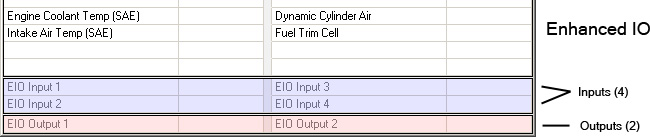
Input signal must be a 0-5v+ source.
You can monitor predefined inputs or create your own input
type.
Each box in the grid represents an individual input on the
interface. Use the above picture as a guide.
To add an input to the table display, select the box in the grid
that corresponds to the input # you are using on your interface
then right click and select insert.
The insert menu will display a list of predefined inputs, which you
can select from.
If you do not see your sensor in the list you can add it manually
by using one of the existing user defined spaces. Simply click
Configure User Defined from under the User Defined list.
If you would like your sensor to be added permanently, please
e-mail support@hptuners.com with all of
your sensor information.
Predefined Inputs
- Wide Band O2 - LM1: result = volts / .5 + 10
- Wide Band O2 - TE 2A0: result = volts / .5 + 9
- Wide Band O2 - PLX: result = volts / .5 + 10
- Wide Band O2 - Autronic MAFM1: result = volts / .25 +
10
- Wide Band O2 - AEM: result = volts / .5 + 10
- Wide Band O2 - AFM1000: result = volts / .5 + 8
- Wide Band O2 - G100: result = volts / 0.71248 + 9
- Wide Band O2 - DynoJet: result = volts / .625 + 10
- Wide Band O2 - LC1: result = volts / 0.3324 + 7.35
- Wide Band O2 - NGK: result = volts / 0.7142 + 9
- Wide Band O2 - FJO: Internal non-linear map.
- 1 Bar MAP - GM: result = volts / .0533 + 10.354
- 2 Bar MAP - GM: result = volts / .02517 + 9
- Fuel Pressure - Autometer: result = volts / .04 -
12.5
- Raw Voltage: result = volts / 1 + 0
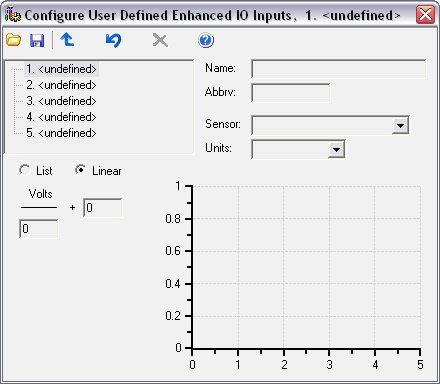
- Select which user
defined input field you would like to modify from the drop down
list.
- Enter the name to be
displayed for your input.
- Define the inputs
Sensor if a type applies.
- Enter the units of
your input.
- Select either List or
Formula.
- List: Enter in the data points manually. 51 total points
ranging from 0 to 5 volts in .1 increments. Format is as
follows:
Volts, Output
0,10
0.1,10.2
0.2,10.4
0.3,10.6
- Linear Formula: Enter in the formula used to convert
voltage to a readable output number.
To calculate a new formula for a custom wideband controller, take
the total output voltage range divided by the AFR range.
Example:
If your wideband controllers output uses a 0v to 5v output, your
output voltage range is 5.
If your wideband controllers output is between 10afr and 18afr,
your AFR range is 8.
Total output voltage range divided by the AFR range would be 5/8 =
0.625
The above number would be placed under the Volts text in your
configuration.
Then, in the + cell, you would enter in the minimum AFR value. For
this example you would enter in 10.
To add your new input, simply insert a new value into your input
table and select it from the User Defined List.
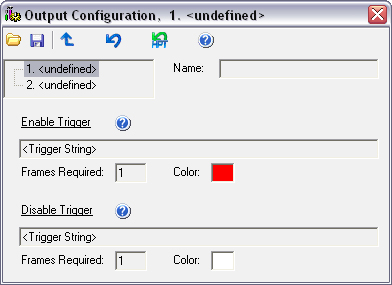
Note: If using a standard (Non-EIO) interface, the table display
will update to reflect the output status but no actual interface
outputs will be triggered.
- Output will be commanded to on when your Enable Trigger
activates.
- Output will be disabled when your Disable Trigger
activates.
- Frames Required is the number of consecutive frames that must
either pass or fail your qualification to force a change in your
output state. It is highly recommended you set this value to 2 or
higher. If you have this set to 1 and have a packet loss, that
individual packet loss could cause the change of state for your
output signal.
- For an output to function, you must define the name, enable
trigger and disable trigger.
- It is common to set your enable trigger > or = to a value,
for example (x > y) OR (x = y).
- It is common to set your disable trigger < to a value, for
example (x < y).
- Note that (x >= y) is invalid as >= is not a valid
conditional operator.