 Tab
Style Navigation
Tab
Style Navigation Tab
Style Navigation
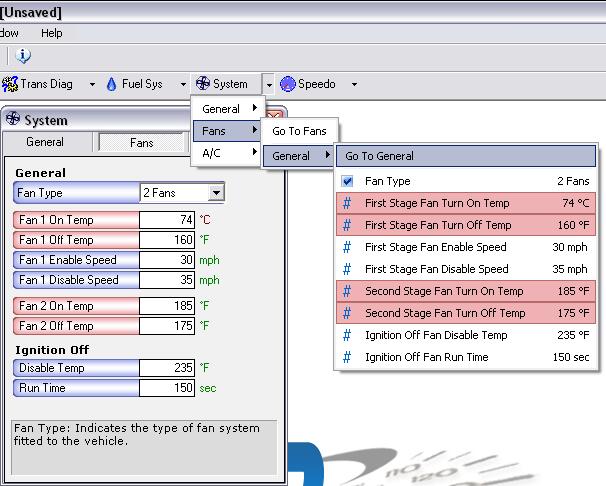
Tab Style Navigation
Tab style navigation is the primary style of navigation for VCM Suite. You will find all of your editable parameters through the tab style view (just as you would with the tree navigator) plus windows like OS Modifications, DTC lists and Speed recalibration that you wouldn't find under the tree navigator.
Parameter Options
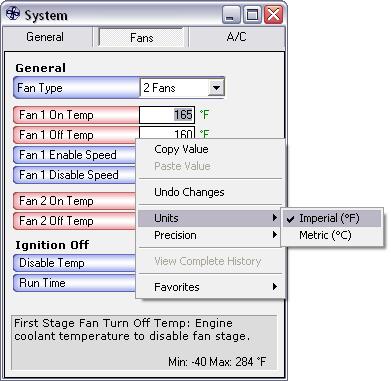
You can right click any switch, constant or table for a menu of
options. Using the right click functionality with VCM Suite will
save you a lot of time. Simply right click the colored background
of the parameter you would like to modify and the menu will
appear.
Special Table Options
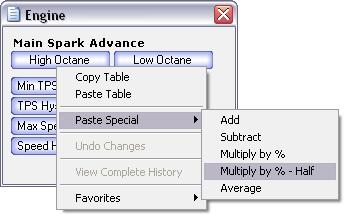
No longer do you have to open up tables to copy and paste. You can
simply right click the table buttons themselves for quick and easy
copy and paste access.
Units
You can toggle any unit that supports both metric and imperial
values by simply clicking on the unit itself. For example, in the
screenshot below if you just click on the F, it will automatically
convert over to C.
