 License Information
 License Information
VCM Suite License Information
If you ever want to know what licenses you currently have, the License Info form is where you need to look.
Loading the Form:
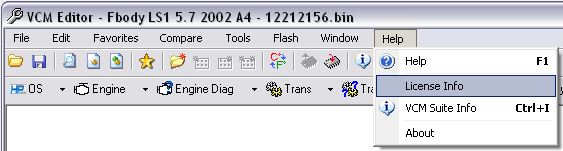
To open the License Information form, locate the menu item in the
Help menu drop down list.
Reading the Form:
There are two possible forms that may come up. If you are a serial
interface customer, you will see a basic form.
If you are a USB MPVI interface user, you will see another form
with credit and application key information.
USB MPVI Interface Users
Current Licenses:
Here you can view all of your current licenses activated.
The Credits column will show how many credits you used (if any) to
activate the license.
The Description column will show you a description of the License
Type and the comment you entered in when licensing the Single
Vehicle licenses encased in [ ]'s (if applicable).
For Single Vehicle licenses, the Vehicle ID is also displayed. This
represents the Single Vehicle Lock.

Available Upgrade Credit Licenses:
This is a very powerful section of our software.
With this form you will be able to tell exactly what licenses you
can purchase at a discounted credit cost using your existing
licenses for Upgrade Credits.
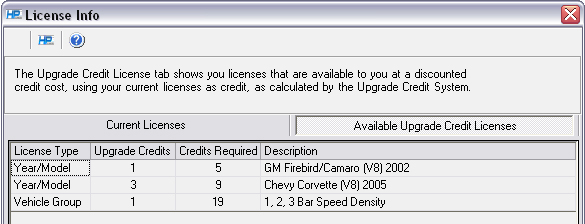
In the picture shown above, we have a single vehicle GM
Firebird/Camaro (V8) 2002 license that cost us 2 credits.
We receive 75% of that purchase (rounded down) as credit (or
Upgrade Credit) toward the applicable Year/Model license.
As you can see below, we received 1 Upgrade Credit for our single
vehicle license and require 5 more to unlock the GM Firebird/Camaro
(V8) 2002 Year/Model license.
Serial Interface Users
Current Licenses:
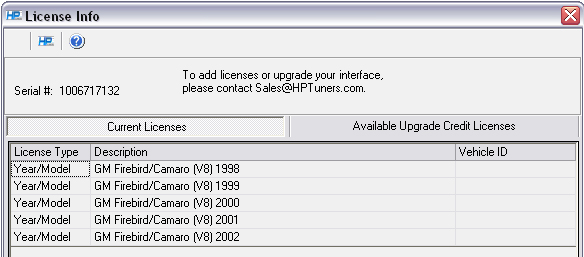
For serial interface customers, this form is pretty simple to
follow.
It simply shows the License Type being either Year/Model or Vehicle
Group and a description of that particular license.
Available Upgrade Credit Licenses:
Upgrade Credits are available for MPVI interfaces only.